Posts

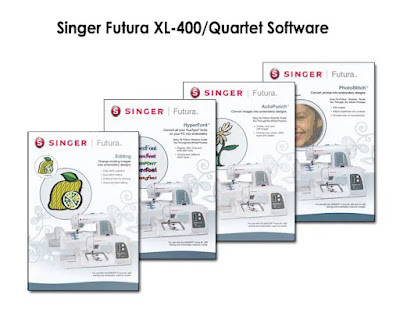
Singer Futura XL-400 / Quartet Software Download
Image
Singer no longer has the Futura Software for sale, so I think it's okay to make the software available to download from dropbox.  It comes with the basic editing software, plus AutoPunch, Hyperfont, and Photostitch, as well as the updated version.  I've included step-by-step instructions which even include how to make it work with Windows 11 computers.  Some people have trouble with it not working with their new computer and need to change the compatibility. Please let me know on facebook if it doesn't work on your computer, as I no longer have this machine, so there's no way for me to test it out. Click here to download the instructions. Click here to download the software. Always check the Singer Futura Help website for updates on your software.  They haven't updated since 2013, but you never know, they may decide to update it some day.  It also has manuals and other helpful tips, and free designs.

Presser Feet Custom Organizer Tutorial

Image
Several years ago I purchased a bunch of presser feet and made my own custom organizer.  You can read about it here .  After a while, I realized I wasn't using many of the presser feet, so I decided to sell the ones I didn't use.  Then I created a new organizer, which is smaller and more easily fits into my desk drawer.  Here's a step-by-step guide how to make your own.... Materials Storage Container with compartments Magic Erasers Scissors Ruler Pen Double-sided Tape First measure the compartment size.  If you are computer savvy, you can create your own spreadsheet using the measurements, and customizing it with your presser feet.  Or you can download the one I made here: pdf ms works Then cut out the magic erasers to fit the compartments.  I didn't need them for each compartment since some of my feet are pretty large. Then print out 3 sheets.  You will cut one, and use the other two for the lid of your organizer. Place the cut labels inside the ...

How to Install the Discontinued Windows Movie Maker onto Windows 10 and 11

Image
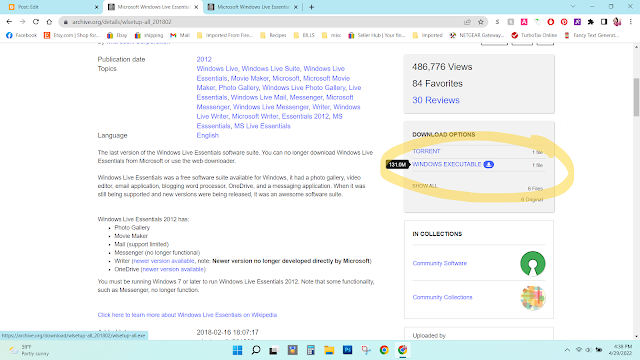
 Windows Movie maker was the best video editing software I have ever used.  It was 100% user-friendly and had many must-have features for making a slideshow or video.  Sadly, Microsoft decided to replace it with a piece of crap software called Video Editor.  It is crap--total crap!  There are no transitions, and is very limited on text and music features.  But there is good news!  You can still download Windows Movie Maker from an archive website here .  Scroll down until you find "Windows Executable."  Click on it to download. Once it's downloaded, I always right click and then scan for viruses.  If there are no threats, double-click the file, and click "yes" if it asks to make changes to your computer. It will then say that you need to install Framework 3.5.  You don't have to do that.  I clicked " Skip this installation " and it installed and worked just fine. Then click  "Choose the programs you want to install." You c...

The Difference Between Class 15 and 15J Bobbins and Why You Should NOT Use Them Interchangeably

Image
Backstory For the past week I've been reattaching all my photos to each of my posts on some of my blogs due to losing all my photos when I deleted my main account (read about it here .)  I ran across the Singer sewing machine reviews that I had done--mainly the Singer 9960 Quantum Stylist --my all-time FAVORITE sewing machine!  I had sold it (along with my Futura XL-400 ) 5 years ago and purchased a Singer Futura XL-580 instead.  (I figured I could sell two machines and just use one, so I wouldn't be using up so much space in my bedroom.)   Since the day I sold it, I've regretted it.  I loved that machine.  A while back when I had checked to see if they still made them, I found it had been discontinued.  I was just curious so I looked again and was surprised that they started making them again!  On sale for $500 on singer.com .  So since I had sold mine on facebook marketplace years ago, I was just curious if someone was selling theirs....

Transferring Ownership of G-Suite to a Regular Google Account and What it Does to Your Photos!

Image
  A while back I posted that I was rebranding, and getting rid of my custom url.  I had an account with Google G-Suite , which is no longer available because they've changed it to Google Workspace .  When I got rid of my custom url (sewinspiredllc.com), I had an option to keep my account with Google Workspace, but I would have to pay a monthly subscription, or I could keep my account as a free account, but once my free trial ran out, I'd have to tell Google I don't want to upgrade.  Otherwise, Google would automatically upgrade to a paying account.  I just didn't want to deal with it, so I deleted my account.  Now I wish I had kept it and looked into how to contact Google to let them know I didn't want to upgrade.  I couldn't find anything on the web, so I just gave up and deleted my account. Before I deleted my account, I backed up all my photos and everything in takeout  from my old G-Suite account.  I even shared my photos with my new acco...

"Could not create the work file” error in Office

Image
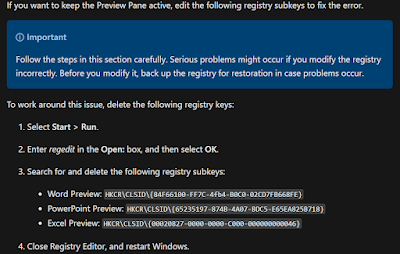
I have Office 2007 and Windows 11.  Every time I am in File Explorer, and click on a Word or Excel document with the Preview Pane on, I get an error message.  I searched online for solutions and most of the time, the solution was to have Preview Pane turned off.  This time, however, I found the solution!  Deleting registry keys was the answer. Found on the microsoft website: If you want to keep the Preview Pane active, edit the following registry subkeys to fix the error. Important Follow the steps in this section carefully. Serious problems might occur if you modify the registry incorrectly. Before you modify it, back up the registry for restoration in case problems occur. To work around this issue, delete the following registry keys: Select Start > Run. Enter regedit in the Open: box, and then select OK. Search for and delete the following registry subkeys: Word Preview: HKCR\CLSID\{84F66100-FF7C-4fb4-B0C0-02CD7FB668FE} PowerPoint Preview: HKCR\CLSID\{65235197-8...

Simple Pencil Pouches with Pellon Vinyl Fuse

Image
A couple months ago I was in Joann's Fabric with my daughter and we saw some cute Looney Tunes fabric on clearance.  My daughter wanted me to make pencil pouches for her and her sister.  This kept me up for several hours one night, just looking for tutorials.  I found a great tutorial online from Positively Splendid for making cute and simple pencil pouches.   After cutting out the pieces, I also used my Cricut Joy  (which I love, by the way, and should post a review on it soon) and Iron On Vinyl to cut out the words.  I used the "Offset" feature in Cricut Design Space to give it the black outline.  I used black for the outside and silver for the inside.  I ironed them on before sewing. The first pencil pouch (FxBugz) I used Pellon Vinyl Fuse  for the outside as well as the inside.  I was not able to find anything online for using Vinyl Fuse on pencil pouches, so this was all trial and error.   I ironed on the vinyl f...

Disclaimer

As an Amazon Associate I earn from qualifying purchases.