Posts

Showing posts with the label Software

How to Install the Discontinued Windows Movie Maker onto Windows 10 and 11
Image
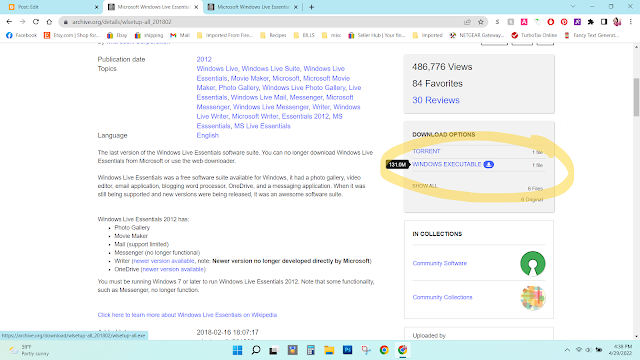
 Windows Movie maker was the best video editing software I have ever used.  It was 100% user-friendly and had many must-have features for making a slideshow or video.  Sadly, Microsoft decided to replace it with a piece of crap software called Video Editor.  It is crap--total crap!  There are no transitions, and is very limited on text and music features.  But there is good news!  You can still download Windows Movie Maker from an archive website here .  Scroll down until you find "Windows Executable."  Click on it to download. Once it's downloaded, I always right click and then scan for viruses.  If there are no threats, double-click the file, and click "yes" if it asks to make changes to your computer. It will then say that you need to install Framework 3.5.  You don't have to do that.  I clicked " Skip this installation " and it installed and worked just fine. Then click  "Choose the programs you want to install." You c...

Remote Desktop with your iphone on Windows 10 Home

Image
My laptop is normally in my living room, plugged in because the battery does not last long.  My printers are in my bedroom/office/craft room.  I scan a lot of patterns and print a lot of things, so I am always going back and forth from the living room to the bedroom.  I wanted a way to remotely control my computer with my iphone so that I didn't have to keep going back and forth. First I googled it and found out that I have to have Windows 10 PRO instead of HOME.  I was about to pay the $99 to upgrade my Windows to Pro.  I even asked the Dell chat representative if there was another way to remotely access my computer with my phone.  After a half hour of searching, he said there was no way.  So I googled it again and found TEAM VIEWER !  It is completely free (unless you use it commercially)!  I downloaded it onto my computer and onto my phone and voila!  I can now be in the bedroom scanning things with my phone instead of going back and ...

Creating Dashed Lines and Curves in Photoshop CS5

I have been making a lot of doll sewing patterns using Photoshop CS5.  I've been having a lot of trouble making the dashed seam lines actually look good.  I see other digital patterns for sale with perfect, uniform dash lines.  I searched everywhere online, including YouTube, to find a way to do it in CS5.  I found tutorials for the newer Photoshop and even Illustrator, but not CS5.  I came really close to just purchasing CS6 (on ebay for around $100) or the new CC for $9.99 a month (which I think is ridiculous because after a few years, you've spent hundreds of dollars on it, when I purchased CS5 for $40 when I was a student.)  Anyway, I FINALLY found the solution!  And now I am sharing it with you.  I have a YouTube video on it here .

Digitizing Old Negatives - Epson v550 and Kodak Mobile Film Scanner review - 110 Negative Scanner - 35mm Negatives

Image
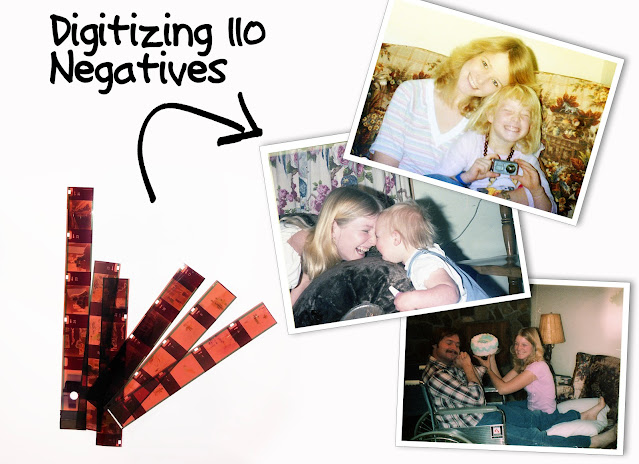
It’s a sad story, really.  My mom passed away about 5 years ago and my dad has taken it so hard that he threw out all the family photos so he wouldn’t be reminded of her.  Luckily, he found the negatives, so I’ve been digitizing them.  This article is the walk-through for digitizing negatives, and also a review of the products I used.  If you’ve read any of my past reviews, you know I am very thorough in my reviews.

Check out my new toy! Sizzix Eclips with eCal for cutting custom shapes

Image
First let me start out with my story for how I came to purchase something like this. I was making Barbie Skipper shoes out of craft foam. If you’ve ever cut small pieces of foam, you know it’s difficult to cut it just right without leaving jagged edges. So I had an idea to purchase a cutting machine. I have a small budget, so I came across the CRICUT MINI  It is advertised to cut through craft foam. It was also advertised to be able to go online and use their Craft Room and use ANY design that they have for FREE, AND to use images that you own.{ Let me reassure you that it does NOT do these things—later explained}

Finding the Right Digitizing Software

Image
I have a Singer Futura CE250 with AutoPunch Software. The capability to take any graphic image and convert it to embroidery is the main reason I purchased it.  The problem is, it doesn’t do a very good job converting the images to clean, good-looking embroidery designs.  So searched online to find a better program. I like to try before I buy. The programs I’ve found range anywhere from $50 to $2,000. Here are some samples of what some of these programs can do. There are many more programs out there, but they don’t have trial versions or the trial versions that they have do not allow auto digitizing. Click the images to see them larger.

Disclaimer

As an Amazon Associate I earn from qualifying purchases.