Posts

"Could not create the work file” error in Office
Image
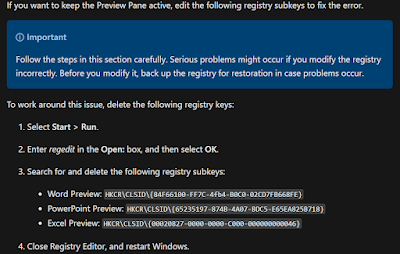
I have Office 2007 and Windows 11.  Every time I am in File Explorer, and click on a Word or Excel document with the Preview Pane on, I get an error message.  I searched online for solutions and most of the time, the solution was to have Preview Pane turned off.  This time, however, I found the solution!  Deleting registry keys was the answer. Found on the microsoft website: If you want to keep the Preview Pane active, edit the following registry subkeys to fix the error. Important Follow the steps in this section carefully. Serious problems might occur if you modify the registry incorrectly. Before you modify it, back up the registry for restoration in case problems occur. To work around this issue, delete the following registry keys: Select Start > Run. Enter regedit in the Open: box, and then select OK. Search for and delete the following registry subkeys: Word Preview: HKCR\CLSID\{84F66100-FF7C-4fb4-B0C0-02CD7FB668FE} PowerPoint Preview: HKCR\CLSID\{65235197-8...

Simple Pencil Pouches with Pellon Vinyl Fuse

Image
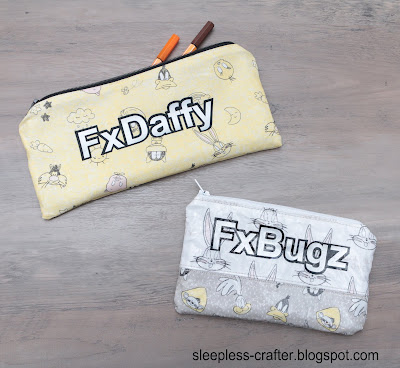
A couple months ago I was in Joann's Fabric with my daughter and we saw some cute Looney Tunes fabric on clearance.  My daughter wanted me to make pencil pouches for her and her sister.  This kept me up for several hours one night, just looking for tutorials.  I found a great tutorial online from Positively Splendid for making cute and simple pencil pouches.   After cutting out the pieces, I also used my Cricut Joy  (which I love, by the way, and should post a review on it soon) and Iron On Vinyl to cut out the words.  I used the "Offset" feature in Cricut Design Space to give it the black outline.  I used black for the outside and silver for the inside.  I ironed them on before sewing. The first pencil pouch (FxBugz) I used Pellon Vinyl Fuse  for the outside as well as the inside.  I was not able to find anything online for using Vinyl Fuse on pencil pouches, so this was all trial and error.   I ironed on the vinyl f...

I've Rebranded - Sleepless Crafter

Image
If anyone has read my About Me page, they know that I was trying to make a business out of my crafts, then went to work outside the home, thereby destroying my craft business (and health), and now I have quit my job (due to health issues), and am focussing on my business again. As I lay awake one night, thinking and dreaming about craft projects (I mean literally, every stinking hour I woke up with some idea popping in my head), I decided Sleepless Crafter was the perfect name for my rebrand. What's my plan now?  My goal is to make youtube videos showing sewing and craft tutorials, (including cabbage patch tutorials on my cabbage patch channel ), continue to draft cabbage patch patterns, and start selling SVG files for cutting machines.  All of this (especially the videos) is going to take a LOT of work, and depending on how good my body is to me, I hope to accomplish what I set out to do.  I have fibromyalgia, so I am at the whim of my body.  There are days I feel...

I'm Dyeing Again--Dyeing Fabric, That Is

Image
I recently purchased some Martha Nelson Thomas Doll Baby pre-sewn bodies from the 1980s. I also bought some Windsor Comfort fabric from etsy . It was called Pale Fawn. When it arrived, I was surprised at how white it was--nothing like the doll fabric. So I decided to buy some Rit DyeMore fabric dye for synthetic fabric.  I used a large 12-quart  stainless steel pot with 1.5 gallons of water, brought to a boil and 1 yard of fabric. I added a tiny squirt of dishsoap once it came to a boil, then added the dye, then the dry fabric. First I tried 0.6ml each Sandstone and Apricot Orange. It wasn't the right color.  So using the already dyed fabric, I tried 1.2ml each Red, Sandstone, and Apricot Orange. It was close to the same color but a little too orange.  Then I tried 0.2ml red, and 1.2ml sandstone to the non-dyed piece of fabric. It did not change the color at all, as though the dye did not work.  I don't know if maybe the bottles had the wrong dye in it or what....

New Website URL

 I have had the domain sewinspiredllc.com for almost 10 years now.  I don't use this blog as much as my Cabbage Patch blog and I feel that paying for a domain that I rarely use is a waste of money.  So once my domain subscription runs out, my new blog address will be sleepless-crafter.blogspot.com.  The change won't be in affect until February 2022.

How to Upload Images to Instagram on Your Laptop

Image
 I recently started a new Instagram account that I wanted all my cabbage patch patterns uploaded to.  It was going to be a hassle to save each one onto my phone just to be able to upload, so I found a very easy way to do it from my laptop!  You don't have to download anything, just follow the instructions on this blog .  Right click anywhere on the instagram page, then click "inspect."  When a window pops up, there is a picture of a phone/tablet (or Ctrl+Shift+M).  Click that.  You're good to go. Here's my new Instagram account:  https://www.instagram.com/cpkdiana/

Windows Open Live Writer with Windows 10

Image
I used to use Windows Live Writer for writing my blog all the time.  It's so much easier than using blogger because you can position the photos exactly where you want.  Then it stopped working, so I uninstalled it. But, then I realized that I had a draft post saved on my computer that I had used with Windows Live Writer.  It was pretty lengthy and had a lot of photos.  I didn't want to lose it, so I had to download it again.  The Live Writer that is available in the Windows app store does not work at all.  It will not connect to the blogger account.  I would get an error message that said, "Sign in with Google temporarily disabled for this app."  So I googled the problem and found one that works . Download Open Live Writer

Disclaimer

As an Amazon Associate I earn from qualifying purchases.