Posts

I'm Dyeing Again--Dyeing Fabric, That Is

Image
I recently purchased some Martha Nelson Thomas Doll Baby pre-sewn bodies from the 1980s. I also bought some Windsor Comfort fabric from etsy . It was called Pale Fawn. When it arrived, I was surprised at how white it was--nothing like the doll fabric. So I decided to buy some Rit DyeMore fabric dye for synthetic fabric.  I used a large 12-quart  stainless steel pot with 1.5 gallons of water, brought to a boil and 1 yard of fabric. I added a tiny squirt of dishsoap once it came to a boil, then added the dye, then the dry fabric. First I tried 0.6ml each Sandstone and Apricot Orange. It wasn't the right color.  So using the already dyed fabric, I tried 1.2ml each Red, Sandstone, and Apricot Orange. It was close to the same color but a little too orange.  Then I tried 0.2ml red, and 1.2ml sandstone to the non-dyed piece of fabric. It did not change the color at all, as though the dye did not work.  I don't know if maybe the bottles had the wrong dye in it or what....

New Website URL

 I have had the domain sewinspiredllc.com for almost 10 years now.  I don't use this blog as much as my Cabbage Patch blog and I feel that paying for a domain that I rarely use is a waste of money.  So once my domain subscription runs out, my new blog address will be sleepless-crafter.blogspot.com.  The change won't be in affect until February 2022.

How to Upload Images to Instagram on Your Laptop

Image
 I recently started a new Instagram account that I wanted all my cabbage patch patterns uploaded to.  It was going to be a hassle to save each one onto my phone just to be able to upload, so I found a very easy way to do it from my laptop!  You don't have to download anything, just follow the instructions on this blog .  Right click anywhere on the instagram page, then click "inspect."  When a window pops up, there is a picture of a phone/tablet (or Ctrl+Shift+M).  Click that.  You're good to go. Here's my new Instagram account:  https://www.instagram.com/cpkdiana/

Windows Open Live Writer with Windows 10

Image
I used to use Windows Live Writer for writing my blog all the time.  It's so much easier than using blogger because you can position the photos exactly where you want.  Then it stopped working, so I uninstalled it. But, then I realized that I had a draft post saved on my computer that I had used with Windows Live Writer.  It was pretty lengthy and had a lot of photos.  I didn't want to lose it, so I had to download it again.  The Live Writer that is available in the Windows app store does not work at all.  It will not connect to the blogger account.  I would get an error message that said, "Sign in with Google temporarily disabled for this app."  So I googled the problem and found one that works . Download Open Live Writer

Remote Desktop with your iphone on Windows 10 Home

Image
My laptop is normally in my living room, plugged in because the battery does not last long.  My printers are in my bedroom/office/craft room.  I scan a lot of patterns and print a lot of things, so I am always going back and forth from the living room to the bedroom.  I wanted a way to remotely control my computer with my iphone so that I didn't have to keep going back and forth. First I googled it and found out that I have to have Windows 10 PRO instead of HOME.  I was about to pay the $99 to upgrade my Windows to Pro.  I even asked the Dell chat representative if there was another way to remotely access my computer with my phone.  After a half hour of searching, he said there was no way.  So I googled it again and found TEAM VIEWER !  It is completely free (unless you use it commercially)!  I downloaded it onto my computer and onto my phone and voila!  I can now be in the bedroom scanning things with my phone instead of going back and ...

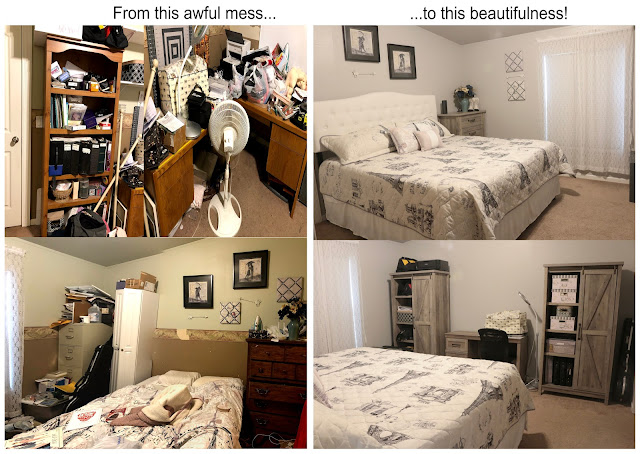
Bedroom/Sewing Room/Office Makeover!

Image
 

Sleep Number Mattress Review iLE (Limited Edition) 360 Smart Bed

Image
My husband and I had the same mattress for 22 years. We have had back problems and sleeping problems. He normally wakes up about five times a night and I am constantly tossing and turning. So we decided to give Sleep Number a try. The main reason we wanted the Sleep Number is because my husband is a heavy man and I am a pretty small woman, compared to him. So whenever he would get in bed, the bed would sink down where he was and it would cause me to roll towards him. For this reason, I wanted a firmer bed. But he wanted a softer bed. So we figured with the Sleep Number, we would both get what we want. We went to a local Sleep Number store on Black Friday and tried out all the beds. I am so glad that we did because each bed feels so different! I almost wish that the salesman wouldn’t have even told us which bed was what so we could just try them all and find out which one we like the best without thinking about the price or anything else. Amazingly, the bed both of us liked the best wa...

Disclaimer

As an Amazon Associate I earn from qualifying purchases.